
The Site Logo Widget is part of the BlogNews Elementor Add-on.
It enables the display of the website logo in headers, footers, or any Elementor-built template.
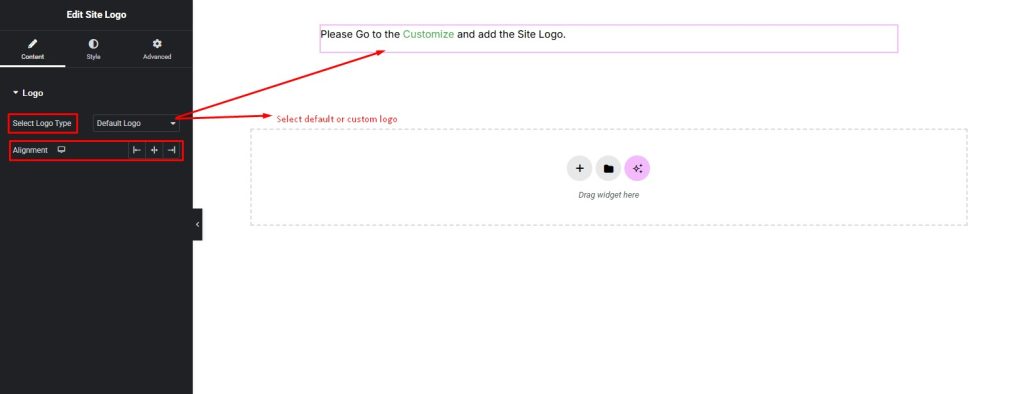
The widget supports dynamic use of the logo set in the WordPress Customizer or allows selecting a custom image.
Advanced styling controls provide full design flexibility without requiring coding knowledge.
How to Use
- Open any page, header, footer, or custom template using the Elementor editor.
- Locate the Site Logo Widget in the BlogNews section of Elementor’s widget panel.
- Drag and drop the widget into the desired section of the layout.

Content Setting
The Site Logo Widget offers two source options for the logo:
- Customizer Logo (Default): Displays the logo set in Appearance → Customize → Site Identity → Site Logo.
- Custom Image: Upload or select a custom image from the media library to display as the logo in specific templates.
Styling Setting
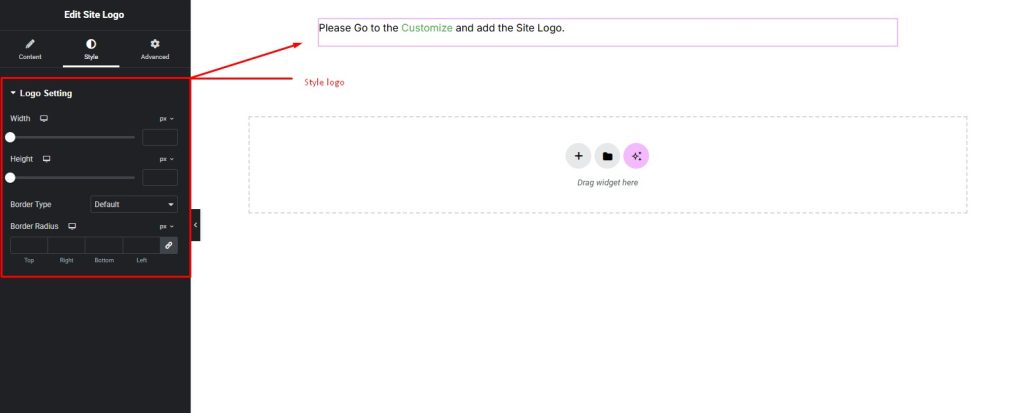
The Site Logo Widget includes various styling options:
- Logo Width: Set maximum width in px or % to control logo size per device.
- Alignment: Choose Left, Center, or Right alignment.
- Padding & Margin: Customize spacing around the logo for precise layout control.
- Border: Add borders with selectable style, color, width, and border-radius.
- Box Shadow: Apply shadow effects to enhance visual depth.
- Responsive Controls: Independently set logo width, alignment, and spacing for Desktop, Tablet, and Mobile views.
Pro Tip
- Combining the Site Logo Widget with the BlogNews Nav Menu Widget creates a fully custom header without additional coding.