Skip to content
Docs Themeansar
  • Documentation
  • Submit Ticket
  • Back To Site

Newsup Pro

⌘K
  • Installation
  • Colors Settings
    • Predefined Colors
    • Own Theme Color
    • Theme Style
    • Header Text Color Settings
    • Category Colors
  • Uploading Your Logo
  • Header Setting
    • Header Layout Settings
  • header image setting
  • Frontpage Options
    • Editor Choice
    • Top Tags
    • Hot News Posts
  • Slider & Tabs Setting
  • Banner Advertisement
  • Typography Setting
  • Footer Options
  • TA 3 Column Posts Slider
  • TA: Horizontal/Vertical Posts
  • TA Double Categories Posts
  • TA Latest News Post
  • TA Posts Carousel
  • TA Posts List
  • TA Posts Slider
  • TA Tabbed Posts
  • Single Related Post Settings
  • How to add Contact Widgets
  • Newsup Pro Feature Image on Post
  1. Home
  2. Newsup Pro
  3. Newsup Pro Feature Image on Post

Newsup Pro Feature Image on Post

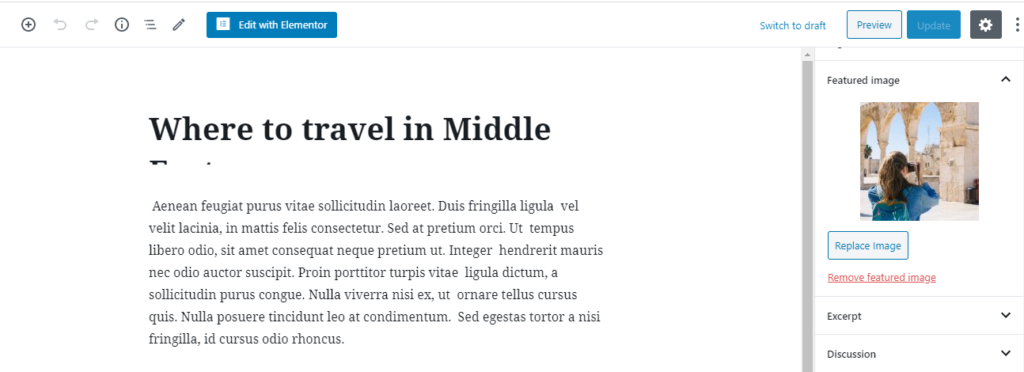
To Feature Image on Post

Step-0 Go to post > edit

Step-1 Go to set featured image update

Doc navigation

← How to add Contact Widgets
Still stuck? How can we help?
Updated on October 22, 2021
Was this article helpful to you? No 7 Yes 7

How can we help?

Translate »